创建Question页为发音的卡片
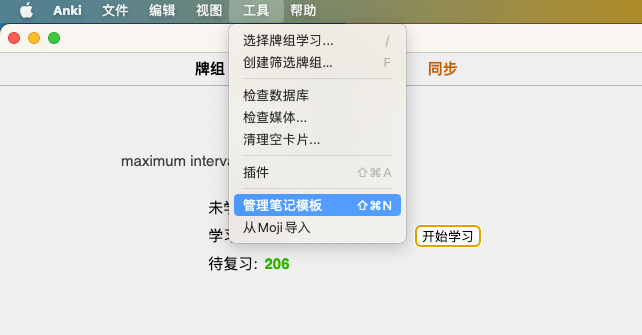
1.打开菜单[管理笔记模板]
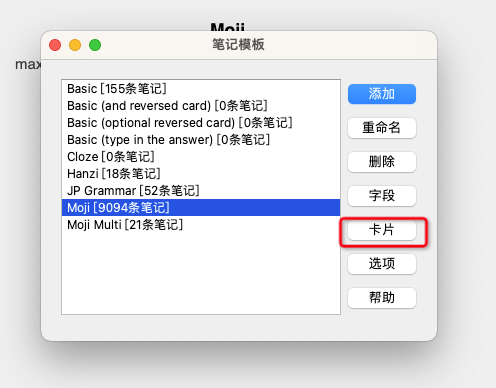
2.在左侧选择对应的笔记模板后,在右侧点击按钮[卡片]
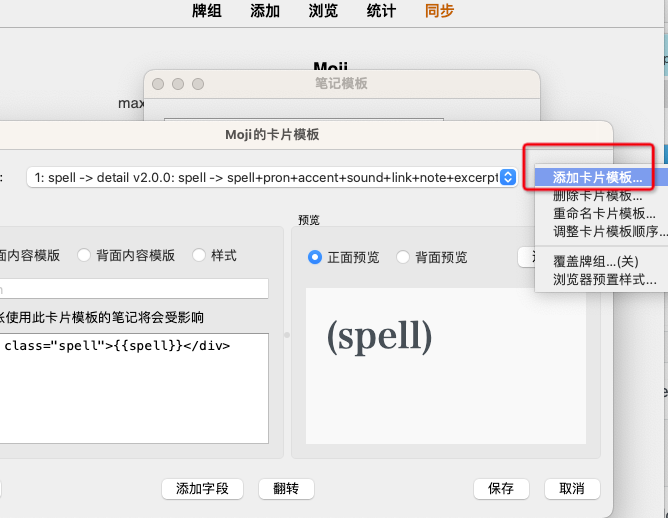
3.在右上角选择[添加卡片模板]或在左侧直接编辑已有的卡片模板
4.在[正面内容模板]中填入以下内容
<div class="spell">{{pron}}{{accent}}</div>
<div class="sound">{{sound}}</div>
<script>
    var replayButton = document.getElementsByClassName('replay-button')[0];
    if(replayButton){
        replayButton.innerHTML='<svg t="1670944272402" class="playImage" viewBox="0 0 1137 1024" version="1.1" xmlns="http://www.w3.org/2000/svg" p-id="9821" xmlns:xlink="http://www.w3.org/1999/xlink" width="17.765625" height="16"><path d="M798.776889 282.453333a358.513778 358.513778 0 0 1 0 482.816 45.397333 45.397333 0 0 1-19.683556 23.324445 46.193778 46.193778 0 1 1-63.374222-67.015111 269.539556 269.539556 0 0 0 13.312-382.122667 47.502222 47.502222 0 0 1-22.755555-33.621333 47.160889 47.160889 0 0 1 38.912-54.101334 46.421333 46.421333 0 0 1 30.094222 5.404445c10.808889 4.949333 19.285333 14.051556 23.495111 25.315555z m161.564444-168.504889a554.325333 554.325333 0 0 1 153.031111 382.805334c0 167.082667-73.955556 316.529778-190.577777 418.588444l-0.056889-0.113778a46.364444 46.364444 0 0 1-84.878222-26.282666c0-18.261333 10.524444-34.019556 25.827555-41.642667l-0.170667-0.227555a464.384 464.384 0 0 0 159.345778-350.321778 464.042667 464.042667 0 0 0-129.308444-321.649778 47.160889 47.160889 0 1 1 66.844444-61.155556zM464.042667 33.735111C529.408-27.534222 632.035556-2.275556 632.035556 102.684444v818.232889c0 103.936-101.432889 131.527111-168.106667 68.892445l-231.992889-237.340445H90.567111c-59.505778 0-90.225778-33.564444-90.225778-90.282666V361.415111c0-57.742222 29.752889-90.282667 90.225778-90.282667h141.425778L463.985778 33.735111z m77.824 840.931556V151.722667c0-71.111111-30.378667-31.971556-61.098667-1.877334-54.158222 52.963556-135.224889 139.207111-202.126222 211.569778H150.755556c-44.828444 0-60.188444 16.270222-60.188445 60.131556v180.508444c0 44.771556 14.449778 60.131556 60.188445 60.131556h126.407111c67.299556 71.964444 149.105778 158.321778 203.320889 211.797333 31.061333 30.72 61.326222 69.006222 61.326222 0.682667z" p-id="9822"></path></svg>';
    }
</script>
<script>
    function changeDisplay(transId) {
        const trans = document.getElementById('trans-' + transId);
        if (trans.style.display === 'none')
            trans.style.display = 'block'
        else
            trans.style.display = 'none'
    }
</script>
5.在[背面内容模板]中填入以下内容
<div class="spell">{{spell}}</div>
<div class="pron-and-accent">{{pron}}{{accent}}</div>
<div class="path-of-speech">{{part_of_speech}}</div>
<div>
    <span class="sound">{{sound}}</span>
    <a class="to-moji" href="{{MojiToAnki_link:link}}">
        <i class="iconfont"></i>
    </a>
    <a class="update-word" onclick="pycmd('MojiToAnki_update')" href="#">
        <i class="iconfont"></i>
    </a>
</div>
{{#note}}
<div class="note">{{note}}</div>
{{/note}}
<br/>
{{^examples}}
<div style="font-size: 16px;">{{trans}}{{^trans}}{{excerpt}}{{/trans}}</div>
{{/examples}}
<div>{{examples}}</div>
<script>
    var replayButton = document.getElementsByClassName('replay-button')[0];
    if(replayButton){
        replayButton.innerHTML='<i class="iconfont"></i>';
    }
</script>
<script>
    function changeDisplay(transId) {
        const trans = document.getElementById('trans-' + transId);
        if (trans.style.display === 'none')
            trans.style.display = 'block'
        else
            trans.style.display = 'none'
    }
</script>

<script>
    rtList = document.getElementsByTagName('rt')
    for (let i = 0; i < rtList.length; i++) {
        rtList[i].innerText = rtList[i].getAttribute('hiragana')
    }
</script>
6.点击保存