手动更新卡片模板的样式
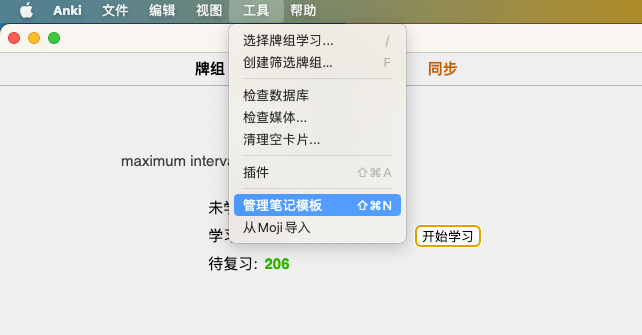
1.打开菜单[管理笔记模板]
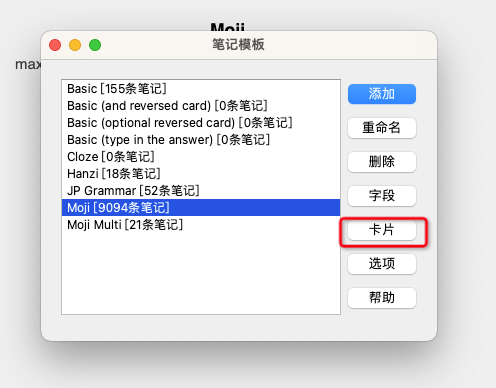
2.在左侧选择对应的笔记模板后,在右侧点击按钮[卡片]
3.在[样式]中填入以下内容
@font-face {
  font-family: iconfont;
  src: url("_iconfont.7a6f8a1.ttf");
}

.iconfont {
    font-family: "iconfont" !important;
    font-size: 20px;
    font-style: normal;
    color: #FF5252;
    padding: 20px;
    margin: -20px;
}


.replay-button i:before {
    content: "\e6c6";
}

.to-moji {
    text-decoration: none;
    display: inline-flex;
    vertical-align: middle;
    margin: 3px;
}

.to-moji i:before{
    content: "\e6c7"
}

.update-word {
    text-decoration: none;
    display: inline-flex;
    vertical-align: middle;
    margin: 3px 3px 3px 10px;
}

.update-word i:before{
    content: "\e6a7"
}

.card {
    min-height: 100%;
    font-size: 14px;
    font-family: "Hiragino Kaku Gothic Pro",Meiryo,MS Gothic,Tahoma,Arial,PingFangSC-Regular,Microsoft Yahei,"黑体";
    text-align: left;
    color: black;
    background: #f8f8f8;
    display: block;
}

.card.nightMode  {
    color: #fafafc;
    background: #0e0e10;
}


.nightMode .spell, .nightMode .pron-and-accent {
    color: #fafafc;
}

.spell {
    color: #3d454c;
    font-size: 36px;
    font-weight: 600;
    font-family: HiraMinProN,'Hiragino Kaku Gothic Pro', Meiryo, MS Gothic, Tahoma, Arial, PingFang SC, '黑体';
}

.pron-and-accent {
    font-size: 16px;
    color: #3d454c;
    line-height: 1.4;
}

.path-of-speech {
    line-height: 3;
}

#sound {
    position:fixed;
    bottom:0;
    left:0;
}

#link {
    position:fixed;
    bottom:0;
    right:30px;
}

.front-trans {
    font-size: 16px;
}

.front-trans li {
    padding-bottom: 10px
}

.word-trans {
    font-size: 16px;
    background: #acacac1a;
    border-radius: 15px;
    padding: 10px;
    margin-bottom: 16px;
}

.nightMode .word-trans {
    background: #acacac1a
}

.example-title {
    padding-left: 16px;
    font-size: 16px;
    line-height: 20px;
}

.example-trans {
    padding-left: 16px;
    color: #8b8787;
    font-size: 14px;
    line-height: 18px;
    margin-bottom: 24px;
}

.note {
    font-size:15px;
    color: #FF5252;
    border: 1px solid #FF5252;
    border-radius: 15px;
    padding: 10px;
}

.sound {
    float: right
}

ruby rt {
    font-weight: 400;
    font-size: 11px;
    text-align: center;
    font-family: "Hiragino Kaku Gothic Pro",Meiryo,MS Gothic,Tahoma,Arial,PingFangSC-Regular,Microsoft Yahei,"黑体";
}
4.点击保存